The instructions below have been customized for your project "".
Customize these instructions for the project
The agent as a reverse proxy
The preferred and most straightforward redirection.io integration way is to use the redirection.io agent as a reverse proxy, using the built-in features that the agent offers.
This reverse proxy features many configuration directives, which should be helpful in many situations to get redirection.io installed on your infrastructure in a performant, simple and scalable way.
How does the redirection.io agent reverse proxy work?
The redirection.io agent reverse proxy is a very simple and straightforward stateless reverse proxy:
- it accepts incoming connections, either as http or https
- it inspects the incoming requests in order to apply any matching rule
- if no rule matches, it forwards the request to the backend of your choice - either http or https
As any reverse proxy, the redirection.io agent can be replicated across your infrastructure. If you need more than one agent in your layout, you can of course duplicate the instance / pod / container. Here are some properties of the redirection.io agent reverse proxy:
- it is fast and can inspect several thousand of request per second (and even more)
- it supports multi-project layouts
- it is a 0-dependency binary. The agent is distributed as an APT or RPM package, and it is also available as a
.tar.gzarchive - it can be monitored using the agent metrics endpoint
- as any reverse-proxy, it is scalable, by launching more instances of the agent
What are the main features of the redirection.io agent reverse proxy?
The redirection.io agent reverse proxy offers many features:
- very high performance, even with a large number of rules
- support for http1, http2 and http3 (quic)
- support for http and https backends, with or without valid certificates
- SSL certificates management using let's encrypt (with automatic renewal) or using your own certificates
- support for the forwarded headers (
X-Forwarded-*orForwarded), to forward the original request properties to the backend - support for multi-projects layouts and virtualhosts
- very flexible timeouts configuration and many performance tweaking options
- basic http caching features, with support for the
Cache-ControlandVaryheaders
Some example proxies configurations
As a standalone reverse proxy, the redirection.io agent can easily be configured to work in all types of layouts:
- as the first layer of your incoming traffic, both for http and https traffic, with SSL termination
- behind other reverse proxies
- behind a nginx or Apache server
- as a traffic manager, between several micro-services of your application
- in front of an API, to detect issues in real-life requests
- in front of a legacy application, to prevent it from being accessed on invalid URLs or using non-GET methods
- in front of a static website, to apply redirections and rules without changing the hosting configuration
This section gives insights on how to insert the redirectionio-agent reverse proxy in your existing web stack.
A traditional web server virtualhost, without redirection.io

Take a standard and simple nginx VirtualHost. The nginx configuration usually defines several directives (server name, port to listen to, document root, etc.). This will be our base example in the next chapters (the approach with another Web Server, like Apache, would be very similar).
The redirection.io agent as a reverse proxy to a http backend
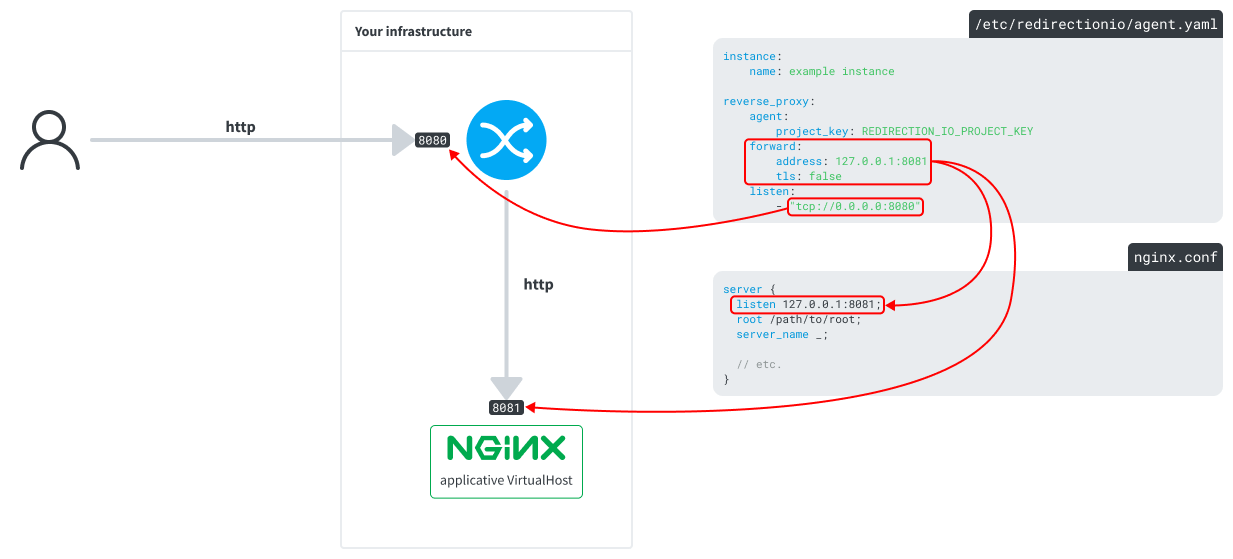
The redirection.io agent bundles a full-featured and highly performant reverse proxy. In the following layout, the agent receives http requests on port 8080, and forwards them to the nginx server on port 8081:
Receiving http and https traffic, with SSL termination
The redirection.io agent can be configured to act as a SSL termination endpoint. See this example:
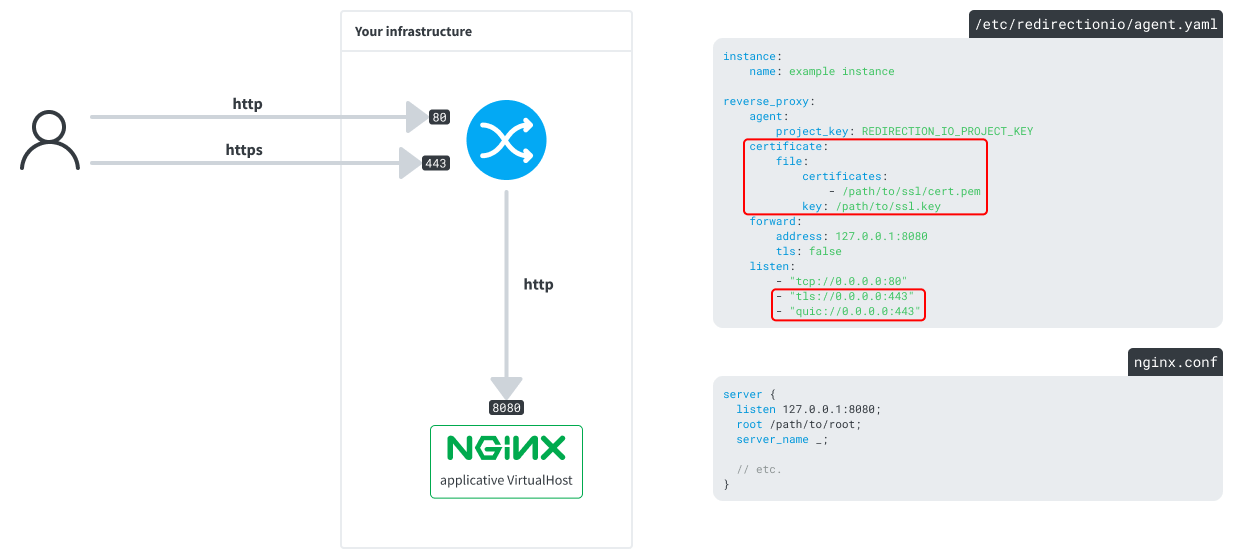
In this layout:
- the agent receives all the incoming requests, on ports
80and443. It accepts http1, http2 and http3 (quic) protocols - a local file SSL certificate is configured for the agent (
/path/to/ssl/cert/pemand/path/to/ssl.key) - the requests are forwarded to the backend server in http (not https)
- it forwards these requests to a locally-available nginx server, on port
8080, in http (not https) - the requests are forwarded using the
X-Forwarded-*request headers, so your backend can be aware of the original request properties.
The agent can also be configured to use a let's encrypt certificate instead of a local file certificate:
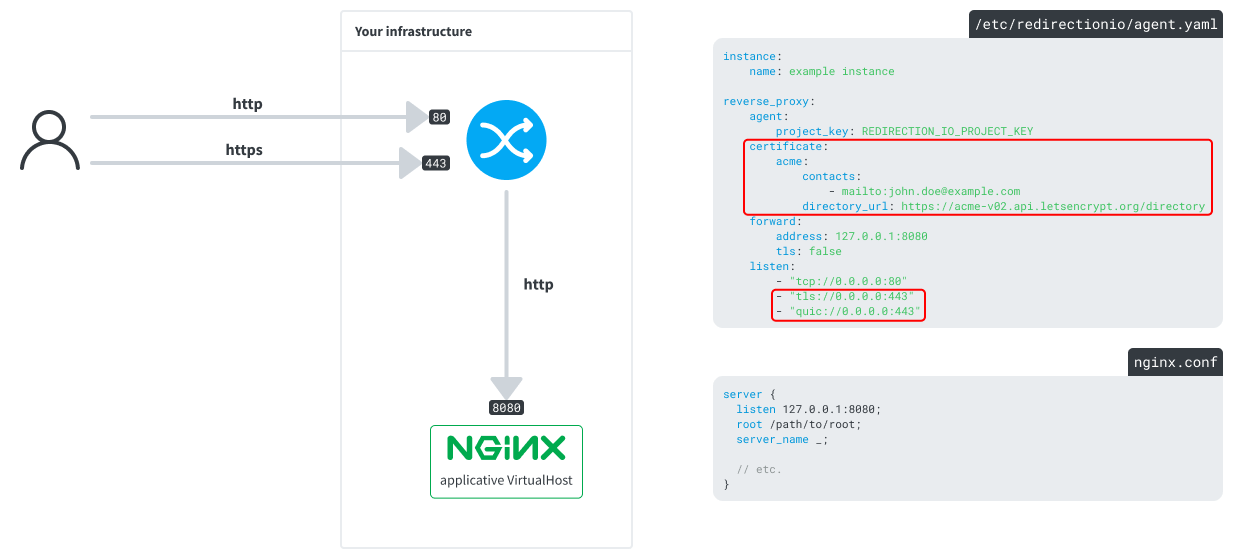
You can even combine both local file certificates and let's encrypt certificates in the same time, to use the local-file at startup time and avoid any downtime, and then let the agent automatically renew the certificate using let's encrypt.
Forwarding requests to a https backend
In the above layout, the agent forwards requests to the backend using the http protocol. In some cases, this might not be enough for your requirements. The agent is also able to forward the requests using https - with a valid certificate or an invalid one (if allow_invalid_certificates is enabled):
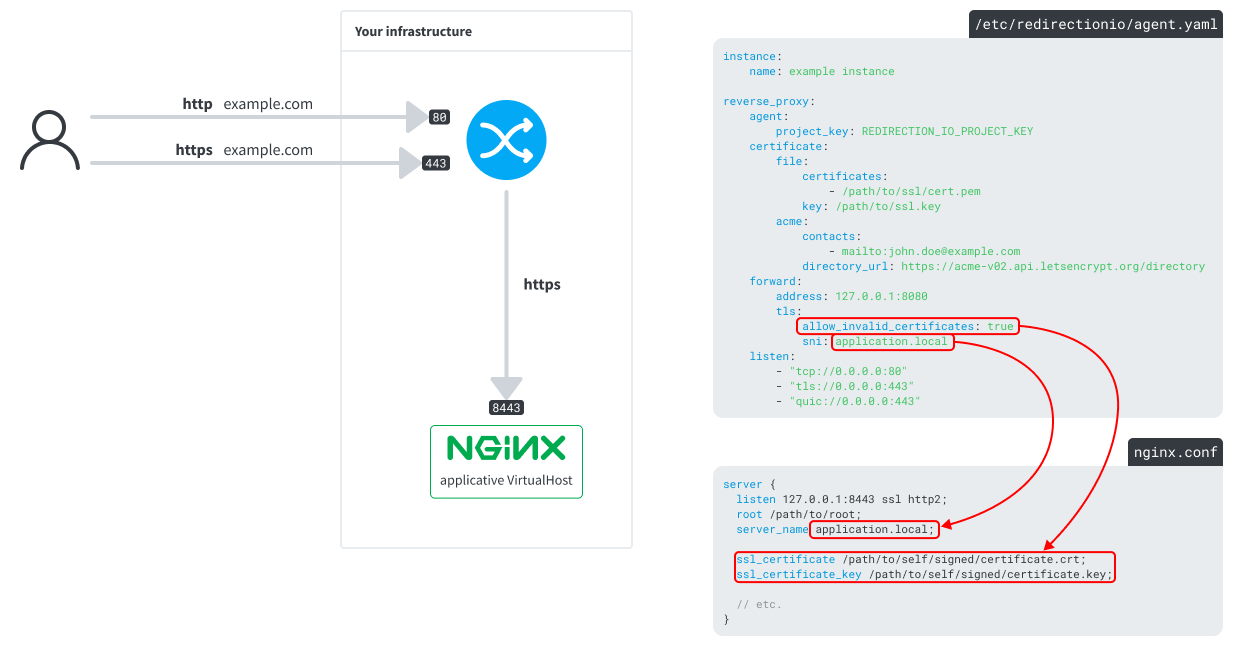
The redirection.io agent built-in reverse proxy supports SNI and many configuration options to manage the SSL connection to the backend. See the detailed documentation about request forwarding for more details about the available options.
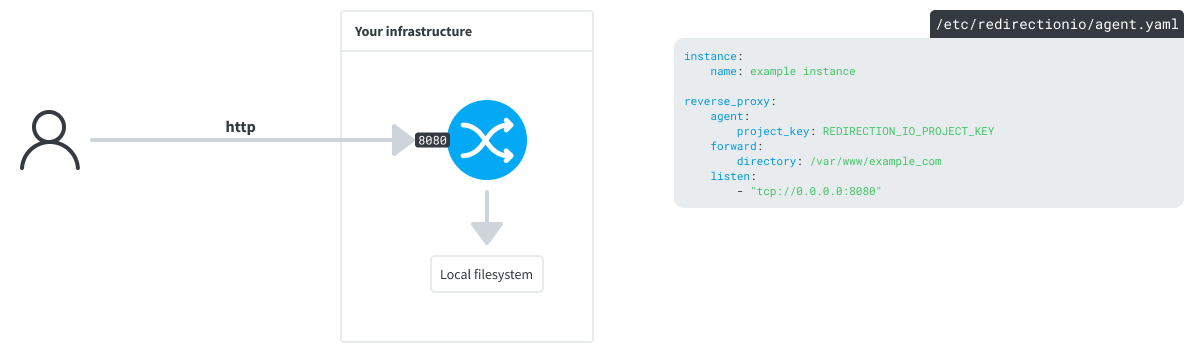
Exposing the local filesystem
It is possible to use a local directory as a backend for the redirection.io agent reverse proxy. This is useful if you want to use the agent as a reverse proxy in front of a static website, for example.
Questions and answers
Can I use the agent as a reverse proxy for several websites?
Yes, the agent has a multi-projects support. In other words, you can use the same redirection.io reverse-proxy process to manage the traffic of several websites deployed, on the same mutualized infrastructure (although you may want to separate stacks, but this is another consideration).
Using the concept of "virtualhosts", the redirection.io agent can route incoming requests to the right project, depending on the domain of the request. This is a very convenient way to manage several websites with a single redirection.io agent instance. The agent can listen on ports 80 and 443, and route the requests to the right project depending on the domain of the request.
See the following example:
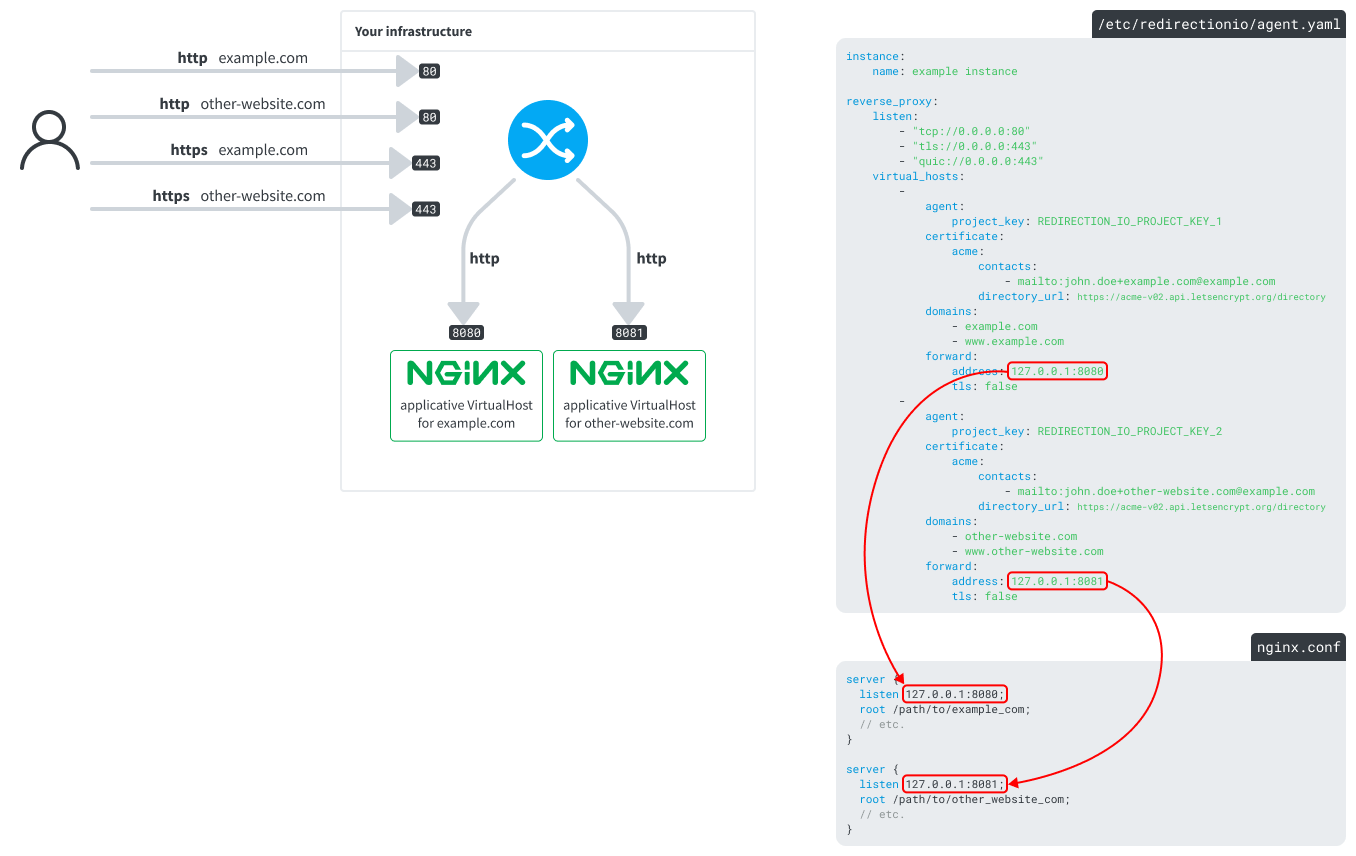
The configuration to achieve this layout is quite simple. The virtual_hosts configuration key allows you to define several virtualhosts, each of them being associated with a project and a set of domains. The agent will then route the incoming requests to the right project, depending on the domain of the request.
instance:
    name: 'My Instance'
reverse_proxy:
    listen:
        - 'tcp://0.0.0.0:80'
        - 'tls://0.0.0.0:443'
        - 'quic://0.0.0.0:443'
    virtual_hosts:
        -
            domains:
                - example.com
            forward:
                address: '127.0.0.1:8080'
            agent:
                project_key: FIRST_PROJECT_KEY
            certificate:
                file:
                    key: /path/to/example-com-cert.key
                    certificates:
                        - /path/to/example-com-cert.pem
        -
            domains:
                - other-website.com
            forward:
                address: '127.0.0.1:8081'
            agent:
                project_key: SECOND_PROJECT_KEY
            certificate:
                file:
                    key: /path/to/other-website-com-cert.key
                    certificates:
                        - /path/to/other-website-com-cert.pem
In this layout:
- the agent receives
httpandhttpsrequests (on ports80and443) - depending on the domain of the request, it routes the requests to one of backend servers (on ports
8080or8081)
By default, the requests are forwarded to the backend using the same Host header as the one of the incoming request. This means that, in the above example, the backend server (eg. nginx, etc.) will receive requests with the Host header set to example.com or other-website.com, depending on the domain of the incoming request. In this case, it is of course possible to use this value in the backend server itself to manage several virtualhosts:
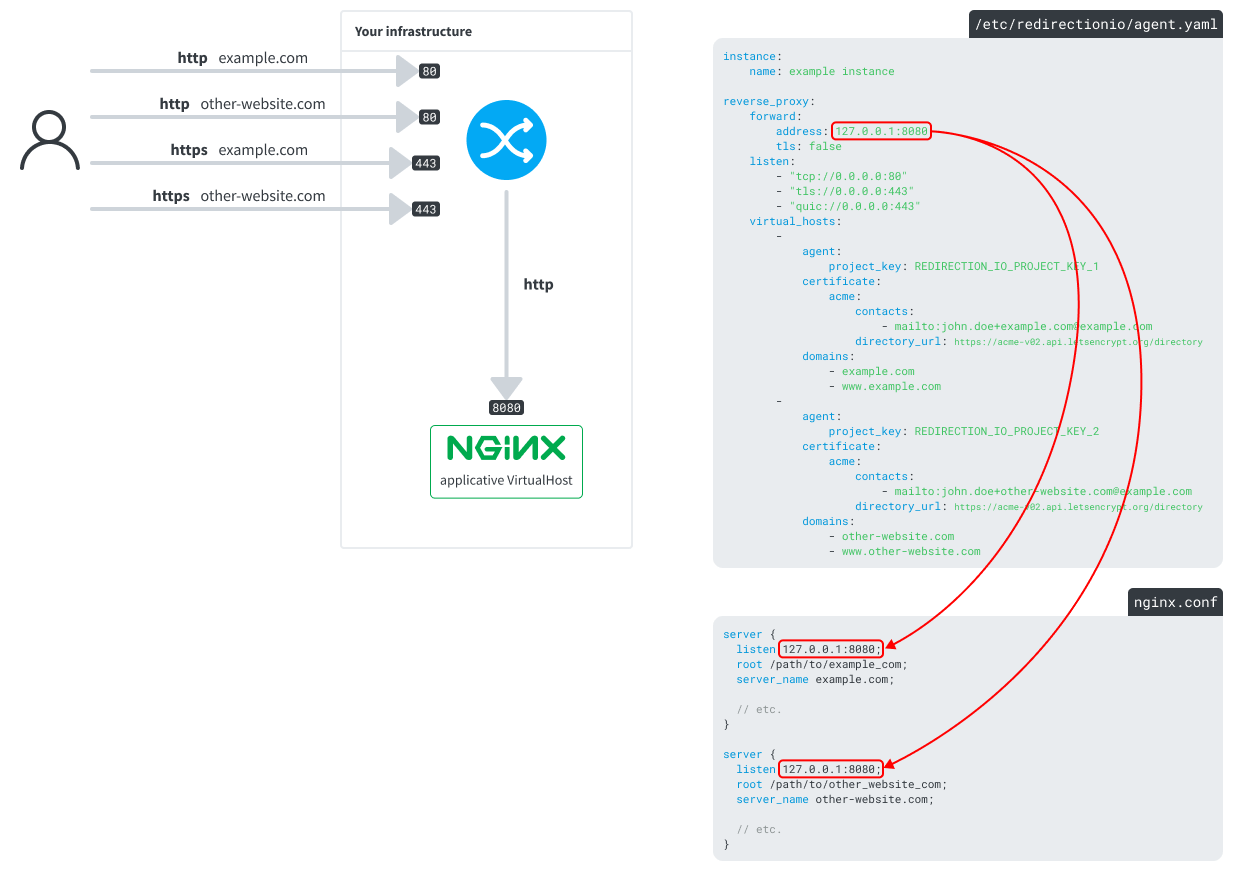
From the redirection.io perspective, this can be achieved using this simple configuration:
instance:
    name: 'My Instance'
reverse_proxy:
    listen:
        - 'tcp://0.0.0.0:80'
        - 'tls://0.0.0.0:443'
        - 'quic://0.0.0.0:443'
    forward:
        address: '127.0.0.1:8080'
    virtual_hosts:
        -
            domains:
                - example.com
            agent:
                project_key: FIRST_PROJECT_KEY
            certificate:
                file:
                    key: /path/to/example-com-cert.key
                    certificates:
                        - /path/to/example-com-cert.pem
        -
            domains:
                - other-website.com
            agent:
                project_key: SECOND_PROJECT_KEY
            certificate:
                file:
                    key: /path/to/other-website-com-cert.key
                    certificates:
                        - /path/to/other-website-com-cert.pem
How can I scale the agent?
The agent is very performant, but you will surely want to scale / mutualize / shard its usage across your servers. This can be simply done by launching several instances of the process.
In a static environment / servers layout, launching several times the redirectionio-agent is absolutely acceptable. Take care to give each instance a unique name, so you can recognize it afterwards in the "instances" screen of the manager graphical interface (and receive notifications if an instance is out of date).
Note that we provide an Ansible role to install and configure the agent.
In dynamic environments, it is also perfectly allowed to launch as many instances of the agent as you need, whenever traffic spikes appear. In order to set a unique name for each instance of the agent, remember that you can use environment variables in the agent configuration.
I can not change the requests flow in my infrastructure, can I still use the redirection.io on my website?
Yes, there are many ways to use redirection.io without using the agent as a reverse proxy. If you are not able to add a reverse proxy in front of your backend server, you can still use redirection.io using our nginx or Apache modules, or even our integrations with Cloudflare, Fastly, Vercel, etc. See the available integrations documentation page for more details about the available integration modes.
Expected performance
As a reverse proxy, the redirection.io agent is a piece of software that you will want to cautiously monitor. It provides an embedded monitoring endpoint which exposes several health-metrics.
The redirection.io reverse proxy is highly performant. We do not provide numbers, but it strongly outperforms mainstream market webservers to run redirections under high load and/or with a large number of configured redirection rules. See our documentation page about performance for more detail.