New crawler checks and a crawl evolution view
We have shipped a batch of improvements to the redirection.io crawler, covering content quality checks, redirect diagnostics, more control over how a crawl runs, and a new way to follow how a site evolves over time.
New content and SEO checks
The crawl report includes several new signals:
- Duplicate content detection: the crawler now flags pages whose content is strictly identical or nearly identical, using a simhash fingerprint. Duplicate content is a common SEO problem that used to be hard to spot across a large site.
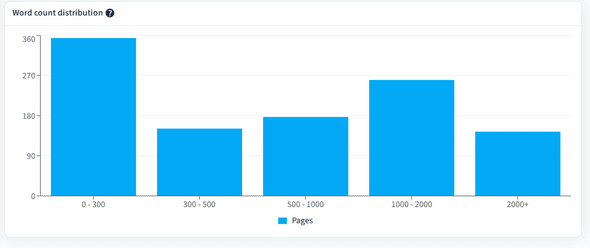


/.well-known/security.txtare missing.


More control over a crawl
You now have finer control over how the crawler behaves:
- Ignore robots directives: a crawl can be configured to deliberately ignore
robots.txtrules, as well asnoindexandnofollowdirectives in the HTML. This is useful to crawl a staging site or to run a full SEO audit. - Custom HTTP headers: a crawl can send custom HTTP headers, for example to reach a staging environment protected by authentication.
- Delay between requests: you can set a delay between each request, including on recurring scheduled crawls, to avoid overloading a site.
- Automatic retry on HTTP error: the crawler now retries a failed request instead of giving up immediately, for more reliable reports on unstable sites.
With these additions, the redirection.io crawler is more configurable than ever, so it can reliably explore even sites that sit behind a web application firewall (WAF).
Follow a site's evolution
The former "Trends" tab has been replaced by a richer Evolution tab, which shows how a project's score and page states change from one crawl to the next, alongside a crawl performance chart. The crawl score is also displayed directly in the crawl list, so you can read it without opening each crawl.

The Evolution tab compares at least two crawls of the same project. Schedule recurring crawls to build up history automatically, and watch trends emerge over time.
To try these out, open the crawler from your project and start or schedule a crawl. Crawl configuration options are documented in the crawler documentation.