Easily implement SEO quick wins

It is often said that the best SEO consultant is above all the one who knows how to get their recommendations implemented. In fact, whether you are an SEO manager in charge of one or several sites, or an SEO consultant supporting several clients (in an agency or independent), your challenge remains the same: ensuring that your recommendations are put in place.
However, with certain clients or on certain sites, you know perfectly well that:
- Only a part of your recommendations will be implemented, for lack of budget and/or resources to do everything
- The implementation of these optimizations can be very long, with a classic process of: * Ticket writing * Need prioritization * Development - which sometimes requires mobilizing third-party stakeholders (host, managed service provider) * Quality Assurance (QA) * Production deployment
And, between the first and the last step of this process, it can sometimes elapse several months, during which your organic traffic stagnates. Yet, you need to have results quickly, whether you are:
- SEO Manager on a new position: you have just arrived, have done your analysis, and want to start implementing your first optimizations - which could allow you to unlock more resources later to move forward on larger projects
- SEO Manager already in post: you have just received the audit delivered by your SEO agency and want to start implementing the recommendations
- SEO Consultant in an agency or independent: you want to support your client in the implementation of the recommendations you have just delivered - with the challenge of course that these are put in place so that the client's organic traffic progresses, that they are satisfied, and continue to work with you
Good news ! With redirection.io, you will be able to move forward in total autonomy on the implementation of SEO "quick wins", that is to say actions:
- Quick and easy to put in place
- Which will not mobilize internal or external resources
- Which will quickly produce results
You are not dependent on internal resources (developer bandwidth) or external resources (web agency or technical provider): you can move forward autonomously on the implementation of your SEO optimizations.
Of course, this mainly concerns technical SEO "quick wins", but not only: you can also optimize the title and the meta description of all the pages of your site, or even work on your internal linking.
Overview of these SEO "quick wins" that you can put in place.
301 Redirect your error pages that receive backlinks
The pages of your site surely receive external links (the famous "backlinks", that is to say links from other sites). These links bring you popularity, and help you improve your positioning on the keywords you target.
However, over time, the URLs of your site may have evolved, and some pages of your site that receive backlinks can henceforth be in error. Problem: a backlink towards an error page will bring you no popularity. This popularity is lost... unless you recover it by redirecting in 301 the page of your site in error target of the backlinks.
Then, how to proceed? Usually, the process is divided into multiple steps that require various tools and resources:
- Retrieve the list of your backlinks from your favorite SEO tool (Babbar, Majestic, Ahrefs, SEMrush), with the associated target page each time
- Identify your target pages that respond in error (404, 500, etc.): certain tools indicate it directly, but the best is to do a crawl on the URLs of your target pages to check their response code and have up-to-date data
- Build the list of redirections to put in place, by crossing the data of your crawl with the data of your backlinks, and by identifying for each backlink in error the URL of the similar page towards which you will redirect it. This gives you a redirects file: Source URL (URL in error), Target URL (similar page), Response code (301)
- Put in place these redirects on your site
With redirection.io, the last step is quite straightforward:you can very easily and quickly put in place a 301 redirection by going on "Rules" > "Create a new rule".

And if you have several URLs to redirect, you can import a CSV file with the list of source URLs, target URLs, and the response code to apply thanks to the import functionality.

Attention: redirections only have sense if the source page and the target page are close semantically (redirection towards a page of similar or close content, redirection of an e-commerce product sheet towards its category, etc.). Do not do mass 301 redirections towards the home page of your site.
Similarly, useless to put in place redirections when the received external link comes from a spammy domain.
Here is the neutral and factual translation of your text:
Interestingly, redirection.io also allows you to optimize steps 1 to 3 of the process described above. Indeed, you can avoid these tedious manual tasks by simply using redirection.io logs. For this, the process is much faster:
- Filter the logs from the last month to keep only those with an external referrer and an error status code, then group them by URL path. This will provide you directly with the list of your error pages that receive backlinks, along with the number of backlinks associated with each of these pages, giving you a clear view of the priorities for your redirections.
- For building the redirection plan, the redirection plan generation feature allows you to obtain a proposal of redirections to implement within a few minutes, providing for each error page a similar or related content page to which it should be redirected.
- It then only remains to import these redirections, as described above, and they are functional on the site. Total process duration: a few minutes, compared to several hours with the traditional process.
Optimize the title of the pages
The HTML <title> element corresponds to the title of the page used by Google in its search results (even if it is free to adapt or modify it). It is about one of the most important SEO elements to optimize.
- On the one hand because the terms used in the title are a signal for Google and the search engines: the title must contain the main keyword targeted by the page
- On the other hand because the way you write the title encourages more or less the user to click on your result, and thus has an impact on the CTR from the search results page

Having a unique and optimized title for each of the pages of its site must thus be a priority.
Yet, during an SEO audit, we frequently see:
- Strategic pages or page templates whose title is not optimized at all
- Pages whose title is duplicated
Today, with the modern CMS, modifying a title is generally quite simple. But it is far from being the case on all the sites, where modifying a simple title can sometimes become the obstacle course that every consultant or SEO manager having worked for a major account knows:
- Writing a ticket
- Prioritization of the ticket
- Development to put in place the optimized title
- Validation of the optimization on a staging environment
- Production deployment
Between the first and the last step, several weeks can sometimes have elapsed. Frustrating, when we know the impact such an optimization can sometimes have on its positioning... and thus on the traffic and the turnover generated.
With redirection.io, you can in a few seconds modify the title of any of your pages. There is even a ready-made recipe for this.

And, in the case where you need to optimize the title of several dozens, hundreds or even thousands of pages, you can use the mass import functionality.
Rather than depending on external resources, and waiting for your developers to have bandwidth, you can thus easily - and in total autonomy - put in place your SEO optimizations.
Redirect internal links in error - while waiting to fix them
A web site evolves over the years, and it is therefore normal to find yourself with internal links in error - especially if you do not take the time to regularly check and correct them. Migrations can also be an important source of internal links to correct.
The correction of internal links can sometimes be a tedious work when it forces to go back over each content to modify the broken link.
In other cases, for certain major account clients, the modification of a link can sometimes only be done "hard", which can require waiting several weeks before the correction is effective online.
When the volume of internal links in error to correct is too important to be able to be carried out within a reasonable delay, or that the correction must intervene quickly, the implementation of 301 redirections from internal links in error towards the right URL is a relevant solution.
Even if internal links should - ideally - be corrected eventually so as to well have only in its internal linking links towards URLs that respond in 200 (OK), putting in place in a first time 301 redirections allows to avoid the loss of internal popularity and the bad user experience associated to links in error.
There again, redirection.io allows you to intervene quickly, easily, and in total autonomy, by adding or importing your redirections.
Correct orphan pages
An orphan page is a page that is not attached to the structure of your site, that is to say it does not receive any internal link. If you took the idea of clicking on each of the internal links of your site, you would thus never arrive on this page... and it is potentially the same thing for the search engine robots.
During an SEO audit, we notice often cases of orphan pages:
- URLs listed in the XML sitemap file, but which do not receive any internal link
- Old "forgotten" pages, still present online, which generate traffic, but are not linked from the rest of the pages of the site
- Content pages generated by the CMS
- Etc.
You can easily identify these pages by crossing the crawl data of your site (by including the crawl of the XML sitemap) with Google Search Console data (pages that achieve impressions and clicks), and even ideally with log data.
For example, with redirection.io, you can use the "log view" already recorded which allows you to filter your logs on the pages visited by Googlebot (the Google crawler), export these data, and cross them with your crawl data.

Once these pages identified, two possibilities:
1. The page is legitimate: it must be integrated into the internal linking
If your orphan page has its place on your site, it is important to ensure that it receives internal links. Indeed, without internal link towards your page:
- It receives no internal popularity, and thus loses in visibility in the search results of Google
- It risks to no longer be visited by the search engine robots, and thus potentially to be deindexed (and a page that is not indexed can of course not generate natural traffic)
To you then to integrate this page into the internal linking of your site. But, there again, on certain sites, such a modification can take a lot of time before being effective online. It is there that redirection.io enters the game again !
With its "Custom HTML Code" functionality, redirection.io allows you to add a block of HTML to one or several existing pages. It is the occasion to add links towards your orphan pages - by ensuring of course that these links are consistent with the content of the source page.

2. The page has no or no more reason to exist: it must be redirected in 301 or return a 410 response code
If your orphan page has no or no more reason to exist, it is necessary however:
- Either to redirect it in 301 towards an equivalent content page (if of course the redirection is justified)
- Either to return a 410 error page
In the first case, it could be about "forgotten" pages, which continue to generate traffic, and that you thus want to redirect towards the new similar content page that you have created.
In the second case, it could be about "technical" pages generated by the CMS, or old uninteresting pages, for which you can return a 410 response code. This will thus avoid to Google to come back to regularly explore these pages.
redirection.io allows you precisely to return the response code of your choice on the URLs you want, either unitarily, or in mass thanks to the import functionality. Ideal for processing quickly this scenario, rather than having to wait to have bandwidth side development, especially for actions that are often not priorities or whose perceived value is little obvious for non-SEOs.

Put in place internal linking blocks
Internal linking is an SEO lever sometimes underestimated. We find generally on a site:
- Downward internal linking (example: category page towards product sheet)
- Upward internal linking (example: product sheet towards category page)
- Transverse internal linking (example: sub-category page towards sub-category page attached to the same parent category)
On the sites with high page volume in particular, internal linking is an important lever for prioritizing the crawl of robots and directing internal popularity towards strategic pages. This translates often by the implementation of contextualized internal linking blocks. It is also necessary to ensure that all the content pages are well linked, and at a reasonable depth level.
Example: I am on SeLoger, on the search results page for apartments for rent in Angers. I can observe:
- Upward internal linking from the breadcrumbs at the bottom of the page (towards the list of apartments for rent in the department, in the region, in France)
- Downward internal linking towards the apartment listings for rent in Angers
- Internal linking blocks, with: * Transverse internal linking towards the search results pages for apartments for rent in nearby cities * Downward internal linking towards the search results pages for apartments for rent in Angers by neighborhood, by number of rooms, by specific criteria, etc.

The implementation of an internal linking project can sometimes take several months to succeed, from the writing of tickets to production.
With the Custom HTML code functionality, redirection.io allows to add HTML to the pages of your site, and thus to insert internal linking blocks.

Of course, it is not about doing all its internal linking in this way, notably when this one is contextualized (cities near the one consulted, professionals of the same city as the one consulted, etc.).
However, this can at least allow to add an internal linking block to boost certain pages (top content / top pages to push)... while waiting for your SEO recommendations on internal linking to finally be online !
Master the site's crawl by modifying the robots.txt file
At the occasion of SEO audits with log analysis, I have several times encountered cases where a typology of URL without interest for SEO consumed a significant share of the crawl budget: duplicate URLs generated by customer reviews, duplicate URLs generated by the session identifier parameter, URLs with sorting and/or filter parameters, etc.
The best solution consists then in blocking from crawl these typologies of URL by modifying the robots.txt file. Thus, Googlebot concentrates its crawl on the useful pages of the site.
But, even though this robots.txt file is only a simple text file, its modification can sometimes take several weeks before being effective with certain clients.
Similarly, on certain CMS, modifying the robots.txt file can sometimes be arduous, and require the intervention of external resources (developers, web agency in charge of the site's management).
To act quickly and in total autonomy, redirection.io allows you to serve a personalized robots.txt file, which you complete and modify directly from the interface. You just have to enter "/robots.txt" in source URL, then choose the "robots.txt" action, and the content you fill will then come to "overwrite" your robots.txt file currently online. It exists by the way a recipe for this.

Think then to well validate your robots.txt file.
Put in place a sitemap
The sitemap file (often in XML format) allows you to list all the URLs of your site, in order to facilitate then their crawl and indexation by search engines.
Declaring a sitemap on Google Search Console allows also to have more details on the indexation of the pages listed in this sitemap, and notably to have a view of the indexation by page typology (if ever we segment the URLs of its site into several sitemaps by type of page, all grouped within a sitemap index file).

This is particularly useful to see if certain typologies of page or page templates have more indexation problems than others, for example by measuring an indexation rate by type of page, and by following its evolution as the optimizations are put in place.
Certain CMS allow to generate automatically an XML sitemap file, with the possibility of controlling the types of page that we integrate into it. But, sometimes, certain sites have an incomplete sitemap, or quite simply non-existent.
As SEO manager, if you do not have the resources (internal or external) necessary to put in place a sitemap, or that its implementation will potentially require several months, you can go through redirection.io to manage this autonomously.
Two possibilities offer to you once you have defined the list of URLs that you want to list in your sitemap (for example via a crawl beforehand).
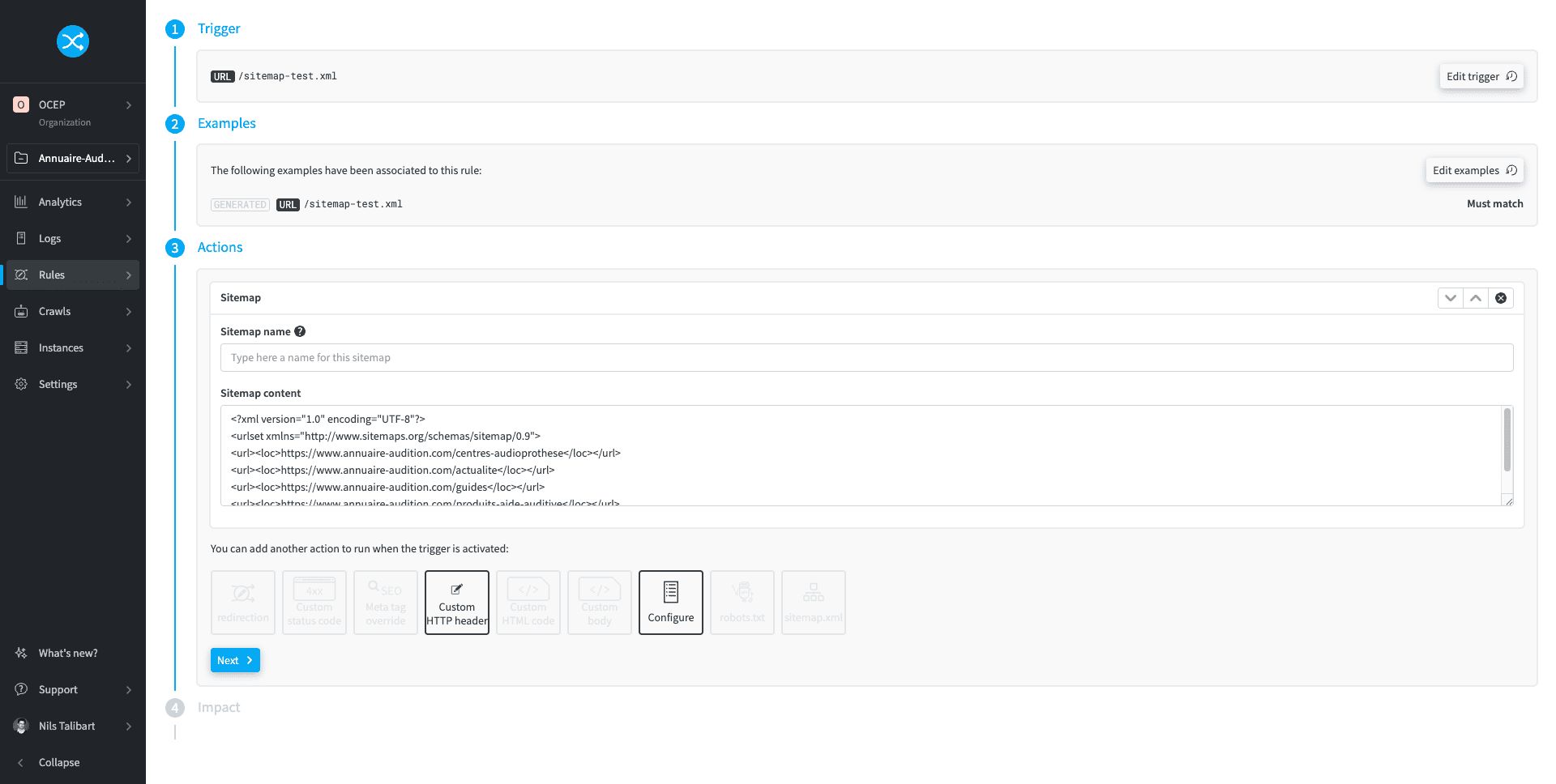
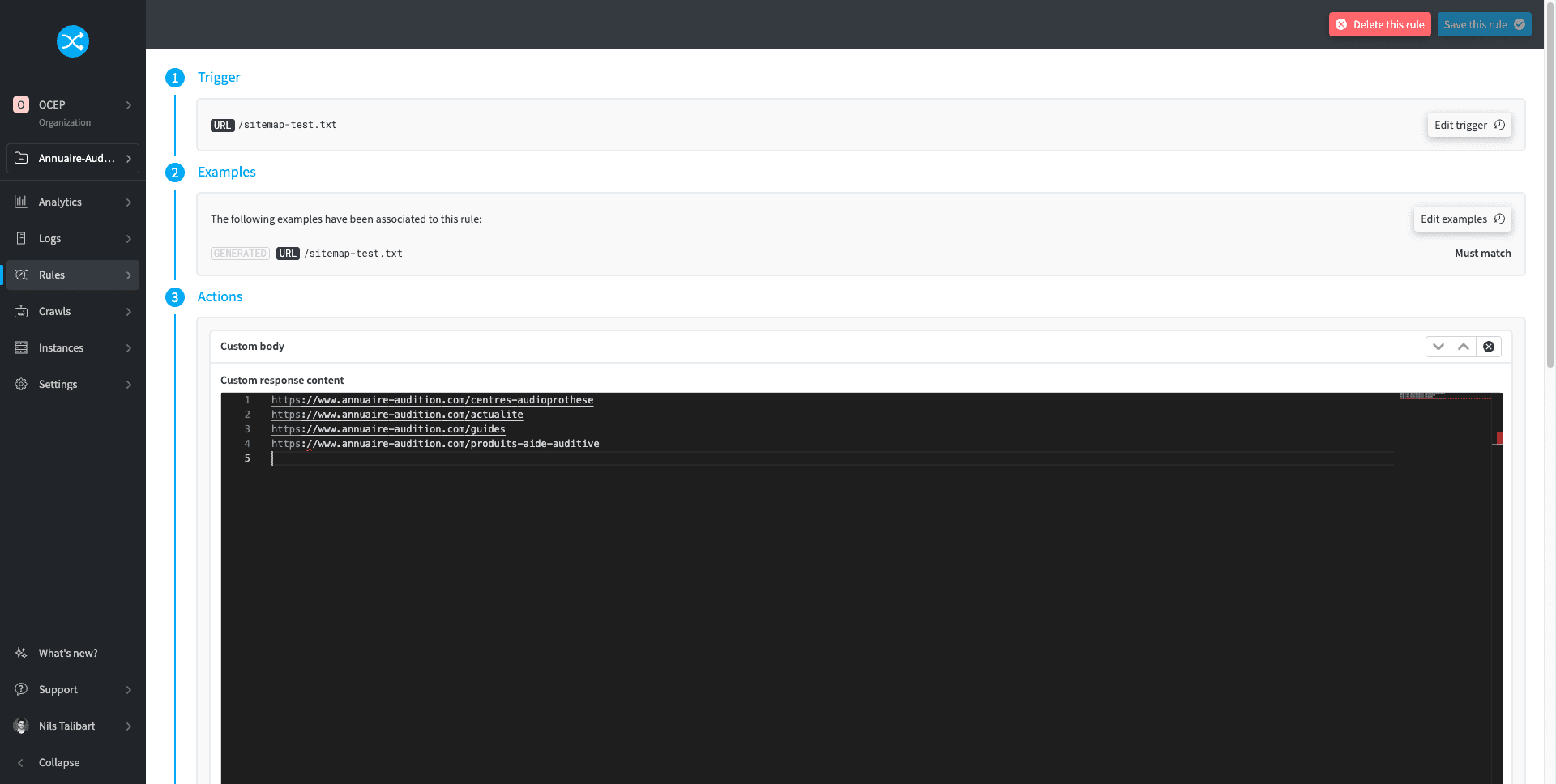


Don't forget then to validate your XML sitemap (in the first case), and of course to declare it on Google Search Console.
Add structured data
Structured data can help search engines and LLMs to better understand the content of your pages. Also, the addition of structured data can trigger the display of rich snippets (stars with a rating, price, information on availability, etc.) in the search results of Google, making de facto the results more attractive, and encouraging more the users to click on the result concerning your site.

Structured data can apply to many types of content:
- Product sheets on an e-commerce site
- Cooking recipes
- Articles
- Local establishments
- Job offers
- Etc.
To quickly put in place structured data on your site, without waiting for your developers to have bandwidth, for you to benefit from external resources, or for your recommendations to finally pass into production, you can use the "Custom HTML Code" functionality of redirection.io. It allows you to add structured data to the pages of your choice, either unitarily, or in mass on several pages.
Here, I have for example added just before the </head> tag of a specific page Restaurant structured data (a subtype of LocalBusiness) thanks to a JSON-LD markup.

Of course, it is not about adding a different Product markup to thousands of product sheets (it would then be necessary to do it URL by URL). But, when the structured data are identical from one page to another of the site (or for a same site section), or that you want to work on a limited number of pages, this functionality allows you to deploy very quickly and in total autonomy structured data on your site.
Return a 410 error on non-desired pages
When I do an SEO audit, I notice very often that many non-desired pages are accessible and respond with a 200 (OK) code:
- Pages empty of any content (but which respond however in
200) - Technical pages generated by the CMS
- Typologies of pages not intended to be explored nor indexed by Google (but which end up being so)
- Etc.
These pages:
- Unnecessarily consume crawl budget
- Do not necessarily send a very good signal to Google on the quality of your site
- Can be visited by internet users, but with a generally very degraded user experience
Often, the CMS allows you to easily pass these pages into noindex. For example, on WordPress, SEO extensions allow you to select the taxonomies that you do not want to index - what has also for effect to remove them from the XML sitemap. But, even if these pages are in noindex, Google can always continue to explore them.
A cleaner solution consists thus in returning a 410 error on these pages, so that Googlebot takes more quickly into account their suppression, and do not come back to explore them anymore.
As we saw a little higher with the orphan pages, you can very easily on the redirection.io interface return the response code of your choice on one or several URLs, and thus return an HTTP 410 error code on these non-desired pages.
Put pages in noindex
Without going so far as a 410 response code, you can be brought to want certain pages of your site to be deindexed by the search engines, but to be able to remain online for your users.
The noindex allows you this, either:
- By adding a meta robots noindex tag
- By returning an HTTP
X-Robots-Tagheader with a noindex value
This last solution is by the way the only one possible in the case of PDF files or images that you would want to deindex for example.
With redirection.io, you can thus return an X-Robots-Tag: noindex header on one or several URLs of your choice, or even on a directory (even a complete site). This work is by the way facilitated by an already ready recipe.

Automatically redirect all HTTP URLs towards HTTPS URLs
Although this aspect is henceforth managed better and better, it happens to me still to fall on sites:
- Which do not redirect the HTTP URLs towards their equivalent in HTTPS
- Which do a 302 redirection of HTTP URLs towards their equivalent in HTTPS
Having URLs in HTTPS is today imperative, and you must thus do the necessary for this. With redirection.io, you can in a few seconds 301 redirect your HTTP URLs towards their equivalent in HTTPS.
Correct duplicate content with / without the www in the URL
It happens sometimes that a same page is accessible by two different URLs:
- The "official" URL, for example
www.example.com/page - The same URL without the "www":
example.com/page
This generates duplicate content, since each page of your web site is accessible by two different URLs. Google consumes thus unnecessarily crawl budget to explore duplicate content, and your popularity signals are potentially divided between two versions of URL rather than being concentrated on a single one.
To correct this, put in place an automatic 301 redirection of URLs without the "www" towards their equivalent with the "www" (if of course your site is accessible on this subdomain). redirection.io proposes a recipe to do it easily.
And if you do not even want to bother with the management of the domain to redirect (example.com in the example above), the creation of SSL certificates, etc., redirection.io offers you managed instances with an SSL certificate already in place, all on a high-performance and secure infrastructure.
Correct the indexation of your staging
Oops, Google has indexed your staging version ! A great classic, in particular if you have not protected the access. Consequence: your staging URLs position themselves in the search results of Google, they are accessible to everyone (with potentially a degraded user experience), and generate duplicate content with your production version.
You can then declare on Google Search Console the property that corresponds to the URL of your staging, and ask Google to delete all the associated URLs from its search results.

Once this done, you must henceforth put in place an authentication to restrict the access to your staging to the only authorized persons. redirection.io proposes you a recipe to put this in place very easily.
Conclusion
Quite obviously, you will not deploy the totality of your SEO roadmap with "quick wins". However, many technical SEO actions can be put in place easily, quickly and in total autonomy thanks to redirection.io.
As SEO manager or SEO consultant, it is for you the assurance to see your recommendations effective in production in a short delay, without soliciting resources (internal or external), and to be able thus to start generating results and confidence with your client or your hierarchy. With, behind, more ease to obtain resources for your SEO projects on the basis of these first results.